

SketchUp vs Revit: Which 3D Design Software Should Architects Learn in 2026?
Introduction
Ask any architecture student what’s confusing them the most, and a lot of them will say the same thing: SketchUp vs Revit. Both show up everywhere, in school, in tutorials, in job ads, but they’re actually built to do different jobs. Picking the wrong one first can slow you down way more than people expect, and honestly, a lot of students figure this out the hard way. Whether you’re just starting out or trying to sharpen your skills, understanding 3D design software for architects and how these two tools are actually different makes the whole decision so much easier. Here’s a simple, honest breakdown for 2026.
What Is the Difference Between SketchUp and Revit?
At the core, SketchUp vs Revit really comes down to what each tool was built to do in the first place.
- Purpose: SketchUp is for quick 3D sketches and showing off ideas fast. Revit is for detailed, real construction plans that actually get built.
- Workflow: SketchUp lets you sketch things out fast, kind of like playing with digital clay. Revit uses smart parts instead, so walls, doors, and windows act like real building pieces, each one carrying its own information along with it.
- Learning curve: SketchUp is easy to pick up, sometimes in just a few days if you’re paying attention. Revit takes a lot longer, usually weeks or months, simply because there’s more going on under the hood.
- Output: SketchUp is great for pretty renders and walkthroughs you’d show a client. Revit makes the actual construction drawings that builders use on site.
The difference between SketchUp and Revit isn’t really about which one is “better” overall. It’s more about which stage of the design process each one was built for.
Is SketchUp Better Than Revit?
Honestly, this is kind of the wrong question to ask, but everyone asks it anyway, so let’s just answer it properly. Is SketchUp better than Revit really depends on what you’re actually trying to do at that moment.
SketchUp wins when you need to:
- Sketch out and change design ideas fast, without a lot of friction
- Make pretty visuals for a client, without a hard learning curve slowing you down
- Work on smaller projects or early-stage design ideas that are still changing a lot
Revit wins when you need to:
- Make construction drawings that have to be exact and actually match up with each other
- Work on big, complicated projects with a lot of different teams involved
- Share one single model with structural, electrical, and other engineering teams
For SketchUp vs Revit for architecture specifically, most firms in 2026 use SketchUp early on, when ideas are still loose, then switch over to Revit once a project gets serious about actually getting built. Neither one replaces the other one, not really. They just do different jobs at different points in time.
Should You Learn SketchUp or Revit First?
If you’re wondering whether architects should learn SketchUp or Revit first, it really depends on where you happen to be in your journey right now.
- Students and beginners: SketchUp is usually the better place to start. It’s easy to pick up, and it builds your design sense fast, all without needing to understand complicated BIM stuff on day one.
- Fresh graduates out job hunting: Revit becomes important really fast here, since most bigger firms expect you to already know it, even for entry-level jobs straight out of school.
- Working professionals switching roles: this one really depends. Concept and interior designers tend to lean toward SketchUp more, while technical and documentation-heavy jobs lean toward Revit instead.
For SketchUp or Revit for beginners, the honest answer is simple: start with SketchUp to build up some confidence first, then move over to Revit once you’re serious about actually getting hired, because that’s what most job listings around here genuinely ask for.
Can SketchUp and Revit Work Together?
Yes, and in real studios, they usually do, more often than people expect. Can SketchUp and Revit be used together is a genuinely practical question architects ask, and the answer is a clear, simple yes.
Here’s roughly how it usually goes. The first rough design ideas happen in SketchUp, where changes are quick and easy to make without much hassle. Once the design direction feels locked in, the model gets rebuilt, or brought over, into Revit for the detailed work, the documentation, and the teamwork with other departments down the line. You can technically bring SketchUp files straight into Revit as a starting point, though most firms end up rebuilding the important parts directly inside Revit anyway, just to take full advantage of its smart, connected data.
For SketchUp vs Revit for 3D modeling, the two really aren’t rivals in a well-run studio. They’re just different steps along the same overall process.
Which Software Do Abu Dhabi Employers Actually Want?
Looking across job listings in Abu Dhabi and the wider UAE, the pattern is pretty clear once you start noticing it. Revit shows up as a required or strongly preferred skill in most architecture and BIM job listings out there, usually sitting right alongside AutoCAD. Jobs at consultancies, engineering firms, and big government-linked projects regularly ask for Revit experience by name, sometimes along with other BIM tools too, especially once you’re looking at mid-level and senior roles.
SketchUp still shows up here and there, mostly for interior design work, visualization-heavy jobs, and smaller studios, but it’s rarely the only thing a job listing asks for, not the way Revit often is. For SketchUp vs Revit for architects trying to break into the Abu Dhabi job market specifically, Revit tends to be the one that actually gets your foot in the door first, while SketchUp is what makes your portfolio look genuinely great once you’re in the room.
If you’re trying to figure out the best software for architectural design to focus on first for getting hired around here, Revit is usually the safer starting investment, with SketchUp working as a strong extra skill on top, not really a replacement for it.
Where Can You Learn SketchUp and Revit in Abu Dhabi?
CADD International teaches both of these, so you don’t have to figure out which one to learn first all on your own, guessing your way through it.
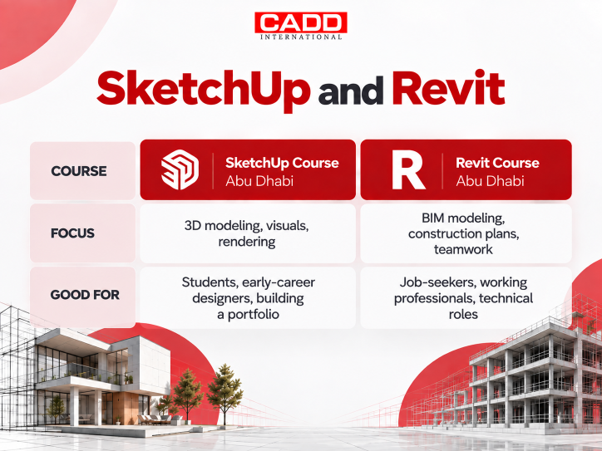
Both SketchUp training Abu Dhabi and Revit training Abu Dhabi are taught in batches with real, hands-on projects, not just boring software tutorials nobody remembers a week later, and you get a certificate once you’re done. If you’re still not sure which one to start with, CADD International’s counsellors can help you figure that out based on exactly where you are right now.
Conclusion
SketchUp vs Revit isn’t really a competition, when you actually think about it. It’s more about order, about knowing what comes first. SketchUp helps you design and show off ideas fast, while things are still loose and changing. Revit helps you turn those same ideas into real, buildable plans that firms actually rely on once things get serious. Most successful architects end up learning both eventually, just at different points along their journey, not all at once.
CADD International runs both the SketchUp course Abu Dhabi and Revit course Abu Dhabi that students and working professionals need to build real, job-ready skills that actually hold up. Get in touch, and let’s figure out the right place for you to start.
FAQs
Yes, usually. SketchUp can be picked up in a few days, while Revit’s more complex system usually takes weeks or months to learn properly, especially for construction work.
Not always, but it helps a lot. Revit is the more commonly required skill in job listings, while SketchUp makes your design portfolio and visuals stronger alongside it.
Yes, that’s possible, especially if you’re aiming for technical or documentation jobs. But a lot of students still find SketchUp useful first, since it builds basic 3D design sense before tackling Revit’s complexity.
Interior designers usually lean more on SketchUp for its speed and visuals, though Revit is getting more common on bigger commercial interior projects that need coordinated plans.
It depends on the batch and how deep the course goes, but most structured Revit training runs several weeks with hands-on, real project work. CADD International’s counsellors can share exact timelines and options.